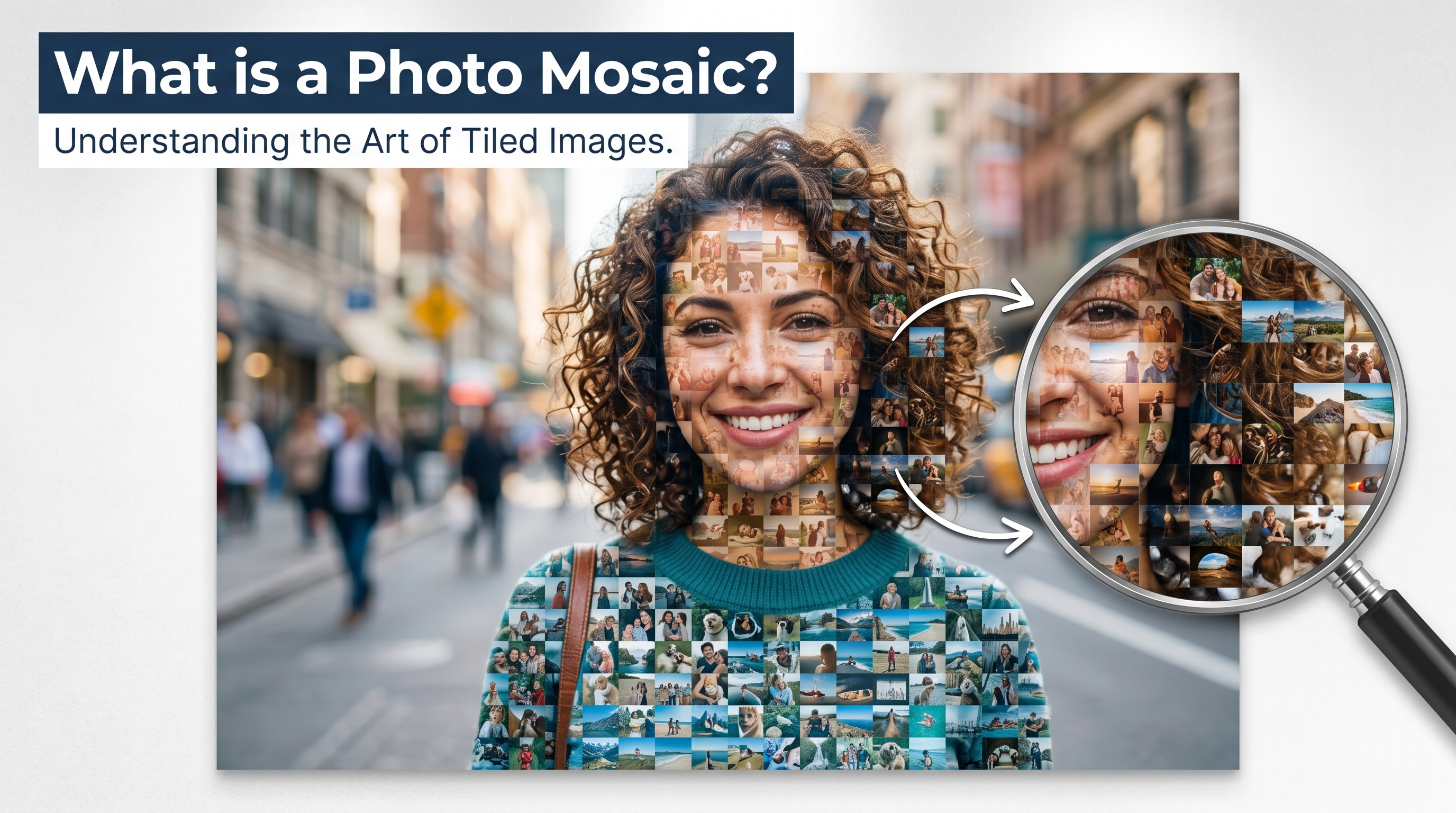
At first glance, it looks like a single portrait — a face, a landscape, or a cherished image. But zoom in, and the magic reveals itself: that large picture is actually made up of hundreds, sometimes thousands, of smaller photographs. That's a photo mosaic.
Photo mosaics have captivated people for decades, appearing in galleries, wedding receptions, graduation celebrations, and memorial services. Today, technology has made them accessible to anyone — no design degree required.
The Definition of a Photo Mosaic
A photo mosaic (sometimes called a photographic mosaic or photo tile mosaic) is a large composite image constructed from a grid of smaller images. Each small image — called a tile — is carefully chosen based on its color and tone to match a specific region of the larger picture.
When viewed from a distance, your eye blends the individual tiles together and perceives the overall image. Step closer, and you discover the individual photos that make up the whole. This dual nature — meaningful from afar and full of personal stories up close — is what makes photo mosaics so emotionally powerful.
Fun fact: The largest photo mosaic ever created contained over 112,000 individual images and covered more than 6,000 square feet. But even a mosaic made from 25–50 personal photos can be breathtaking.
How Does a Photo Mosaic Work?
Creating a photo mosaic involves a surprisingly elegant process. Here's what happens behind the scenes:
1. The Target Image
You start with a portrait or main image — this is the picture your mosaic will recreate. It could be a wedding portrait, a graduation photo, a family photo, or even a pet. The clearer and more recognizable the subject, the more striking the final result.
2. The Tile Pool
Next, you need a collection of smaller photos that will serve as the tiles. These can be photos from your event, pictures shared by friends and family, or any collection of images. The more photos you have, the better the color matching — and the more personal the result.
3. The Algorithm
Software analyzes the target image by dividing it into a grid. For each cell in the grid, it calculates the average color and finds the tile from your photo collection that best matches that color. The result is a seamless grid where every tile is in exactly the right place.
4. The Output
The final mosaic is rendered at high resolution — often 9,600 × 9,600 pixels or larger — making it suitable for printing at poster size or even wall art. You can zoom in to find your own photo among the tiles, which makes the experience interactive and deeply personal.
What Makes a Great Photo Mosaic?
Not all photo mosaics are created equal. The quality of your mosaic depends on a few key factors:
- Number of photos: More tiles mean better color matching and a more detailed result. A minimum of 25 photos is recommended; 100+ produces exceptional results.
- Photo diversity: A varied collection — different lighting, backgrounds, and colors — gives the algorithm more options to work with.
- Target image clarity: A high-contrast portrait with a clear subject works better than a complex or busy image.
- Resolution: Higher-resolution output means you can print larger without losing detail.
Photo Mosaics vs. Other Collage Types
People sometimes confuse photo mosaics with other types of photo collages. Here's how they differ:
- Photo collage: A simple arrangement of photos side by side, with no larger image formed by the whole.
- Photo grid: An organized grid of equal-sized photos, again without a larger picture emerging.
- Photo mosaic: A structured grid where the placement of each tile is algorithmically determined to recreate a specific larger image.
The mosaic is the most technically sophisticated — and visually stunning — of the three.
Where Are Photo Mosaics Used?
Photo mosaics have found a home in nearly every major life event:
- Weddings: A mosaic of the couple's portrait made from guest photos is a breathtaking keepsake and conversation piece at the reception.
- Graduations: A senior photo recreated from four years of memories makes for an unforgettable gift.
- Memorials & tributes: Honoring a loved one with a mosaic built from family photos is a deeply meaningful tribute.
- Corporate events: Companies create mosaics from employee photos for anniversaries, team-building, and office art.
- Birthdays & milestones: Any occasion worth celebrating is worth commemorating with a mosaic.
How to Create a Photo Mosaic Online
Creating a photo mosaic used to require specialized software and hours of manual work. Today, tools like PhotoMosaic.ai make the process simple:
- Create a group and share a link so friends and family can contribute their photos
- Upload your portrait image — the picture your mosaic will recreate
- Let the AI engine analyze and assemble the mosaic automatically
- Download your high-resolution mosaic, ready to print or share
The entire process takes just a few minutes of setup. The more photos your community contributes, the more stunning the result — which is why PhotoMosaic.ai is designed around collaborative photo collection.
Pro tip: For the best results, aim to collect at least 50 photos before generating your mosaic. Each additional photo gives the algorithm more options, improving color accuracy and detail.
Can AI Make Photo Mosaics?
Yes — and modern AI has transformed what's possible. Traditional mosaic software used simple color-matching algorithms. Today's AI-powered tools can analyze images at a deeper level, producing tighter grids, better color fidelity, and sharper results even with smaller tile collections.
PhotoMosaic.ai uses an AI engine that processes your photos in parallel, matches tiles with high precision, and renders the final image at print-ready resolution — all automatically, in just a few minutes.
Frequently Asked Questions
How many photos do I need for a photo mosaic?
You need at least 25 photos to generate a mosaic on PhotoMosaic.ai. For best results, 50–200 photos is ideal. The algorithm can reuse tiles if needed, but more unique photos always produces a better result.
Can I make a photo mosaic for free?
Yes. PhotoMosaic.ai lets you generate a full watermarked preview for free. You pay a one-time fee of $29 only if you want to download the full-resolution, watermark-free version.
What size is the final mosaic?
PhotoMosaic.ai generates mosaics at up to 9,600 × 9,600 pixels — large enough to print at poster or canvas size without losing detail.
Do my guests need an account to contribute photos?
No. Anyone with your unique upload link can add photos without creating an account. This makes it easy to collect photos from less tech-savvy family members.
Ready to Create Your Photo Mosaic?
Turn your most meaningful memories into a stunning work of art. Free to start — no account needed for guests.
Start Your Mosaic — Free